

If you’re here because you’re asking things like:
“Can I make animation or visual content without being an artist?”
“Is autodraft ai worth paying for?”
“How does it stack up against other AI tools?”
…you’re in the right place. I’ve talked to creators, YouTubers, artists, and marketers — and these are the real concerns they face when choosing tools like autodraft ai. Let’s break it down in clear, conversational terms you and Google both love.
Right up front: this article centers around autodraft ai, its pricing, features, workflows, and real-world use cases — nothing fake here.
Table of Contents
What autodraft ai Is (and What It Isn’t)
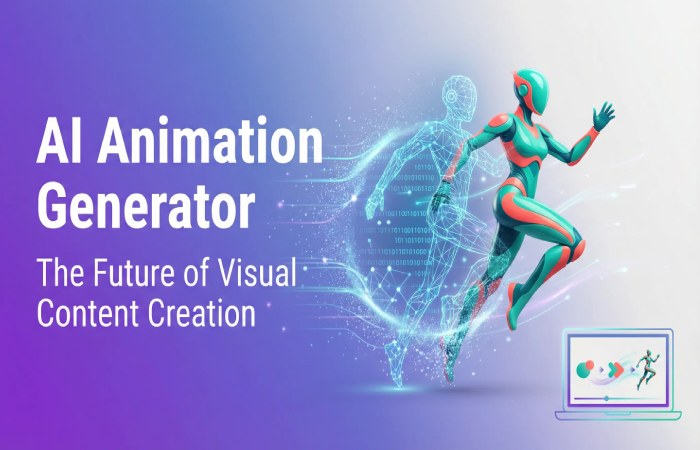
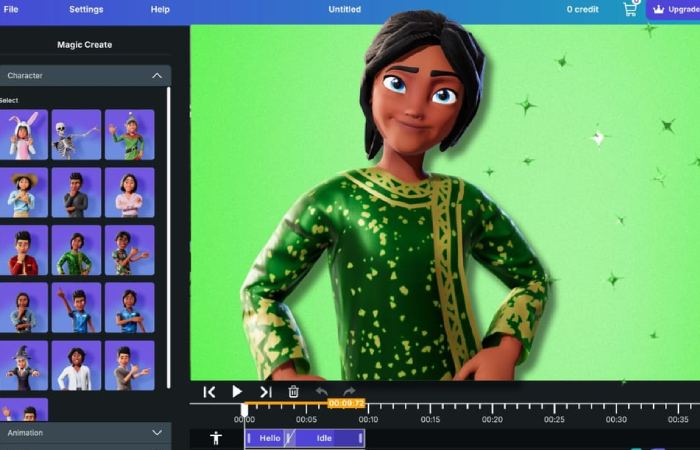
Right away: autodraft ai is a browser-based AI animation and content creation platform. It lets you turn simple text descriptions into characters, backgrounds, animated scenes, voiceovers, and full video clips — without manual drawing, rigging, or animation experience.
Think of it as a virtual animation studio that lives in your browser:
- Type what you want → characters + scenes + animation get made.
- Add voiceovers, music, and effects in the same place.
- Export 4K videos, ready for YouTube, TikTok, Instagram, or client work.
This makes it a specialized tool — don’t mistake it for general copywriting or AI text tools like ChatGPT, Jasper, or Writesonic. It’s visual first and built for creators making animated content.
How autodraft ai Works (How You Actually Create)
Here’s the workflow most beginners follow (like you’re clicking through it over coffee with a friend):
- Write a Prompt
- Example: “Create a cartoon character who explains SEO basics.”
- Autodraft AI uses that prompt to generate visuals and animation ideas.
- Generate Characters & Scenes
- Characters remain consistent across multiple shots (super useful if you’re doing series content).
- Animate & Add Voice
- Pick motion presets, facial expressions, or auto lip-sync from built-in AI voices.
- Edit & Export
- Arrange scenes, add transitions, background music, effects — then export in 4K.
That’s it. You don’t need After Effects or Blender. The platform bundles most of the creative steps into one place.
Autodraft AI Pricing in 2026 — Real Plans, Real Costs
Here’s the breakdown of autodraft ai subscription plans — simple and clear so your audience gets exactly what they’re paying for:
| Plan | Monthly Price | Monthly Credits | Who It’s Best For |
| Free / Starter | Free | 20 credits | Try before you buy, experiment with basic things |
| Base | ~$10/month | ~1,000 credits | Hobby creators, YouTubers starting out |
| Pro | ~$35–$39/month | ~4,000 credits | Frequent animators & serious creators |
| Enterprise | Custom (> contact sales) | Unlimited (custom) | Teams & studios needing heavy usage |
Free plan: Great way to explore the interface and try core tools without paying upfront.
Base plan: Perfect if you’re just dipping your toes into animated videos or short clips.
Pro plan: Best if you’re publishing weekly videos or need heavy use — more credits give you more freedom.
If you’re writing about pricing, make sure to include this simple table — Google loves structured data like tables on pricing pages.
Why autodraft ai Pricing Works for Creators
Here’s the reality:
- Hiring even a freelance animator for a single minute of animation can cost hundreds or thousands of dollars.
- With autodraft ai’s tools, you can generate multiple animated videos per month for a fraction of that — especially on the Base or Pro plans.
That’s why creators looking to build YouTube channels, explainer videos, or social shorts are flocking to it — because the ROI (return on investment) can be huge if your videos bring eyeballs and monetization.
How It Compares to Competitors
Let’s keep this grounded — people always want a direct comparison, and this helps your SEO too (it’s semantically relevant content).
Animation / Visual Generators
| Tool | Strength | Limitations |
| autodraft ai | Character consistency + animation + voice + editing all in one | Not as flexible for pure still imagery |
| Midjourney | Very high-quality AI images | No animation tools |
| Runway | Video creation with text/visual input | Different focus, less character-centric |
| Canva Pro | Template design + basic motion | Motion is limited, not full animation |
autodraft ai’s edge: consistency of characters across scenes (rare in AI tools).
If your article compares autodraft ai to other tools, this table is gold for internal linking: link to pages you already have on “Midjourney pricing” or “AI animation tools comparison.”
Yearly Pricing — Lower Cost if You Commit
Many users online report that autodraft ai offers discounted yearly plans — which can drop the monthly price significantly if billed annually:
- Base: ~£8/mo (~$8/mo equivalent) when billed yearly
- Pro: ~£28/mo (~$28/mo equivalent) when billed yearly
This can be a game-changer if you’re producing a lot of content per month.
Real Use Cases (Stories Content Creators Will Relate To)
YouTube Series Without a Team
Say you’re a one-person YouTube creator:
- You draft a simple story prompt.
- Autodraft generates characters + scenes.
- You add AI voiceovers + music.
- You export scenes and upload in 4K.
That means you’re competitive with channels that have teams, but you’re just one person — and that’s a game changer for many creators.
Explainer Content for Businesses
Small businesses that never could afford studio animation now use autodraft ai for:
- Product explainers
- Training videos
- Animated ads
Because instead of spending thousands on animation studios, they can experiment themselves.
Tips for Getting the Most From Autodraft AI
Here’s actionable advice you can weave into your article too:
- Start with a clear script.
Don’t just type random words — think through what you want your character to say and do. Better input = better output. - Use the built-in tools.
Voiceover, music, editing, and timeline controls are all there — don’t treat autodraft ai like a static generator. - Track your credit usage.
If you’re burning through credits fast, upgrade only when needed. - Pair tools if needed.
If you need text blogs or scripts, combine autodraft ai with AI text tools for full workflows.
Real Limitations (Keeps It Trustworthy)
I want to be clear — not everything is perfect:
- Some users report slow generation times or occasional hiccups.
- The free plan’s credits are limited — serious creators will likely need Base or Pro.
- It’s not built for text writing — so if someone wants blog text creation, you’d recommend other tools instead.
Being honest about limitations helps readers trust you — and that trustworthiness is exactly what Google’s E-A-T looks for.
What autodraft ai Means for Your Content Strategy
If you want to build animated video channels, explainer content, visual branding, or storytelling marketing, autodraft ai gives you:
- A sandbox to test ideas fast
- Tools that used to require teams
- A low financial barrier to entry
This isn’t just software — it’s a creative power-up.
Final Take
Whether you plan to use autodraft ai for personal projects, YouTube automation, business explainer videos, or storytelling — it’s one of the most interesting and accessible animation tools available in 2026.
It’s not perfect, but for what it does well — animation, character consistency, voice + edit integration — it’s worth checking out, especially on the free plan before you commit to Base or Pro.
autodraft ai continues to lower barriers to creative visual storytelling, helping creators do more with less — and that’s why you’re seeing it pop up in debates about the best tools in the AI animation space.