
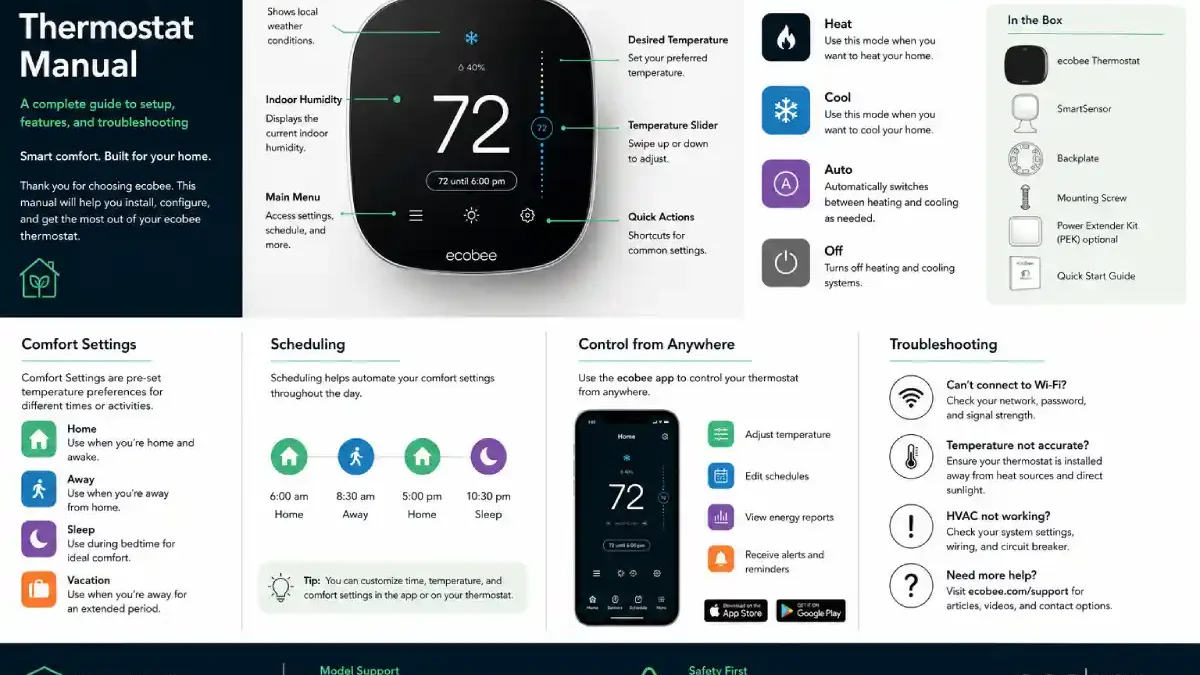

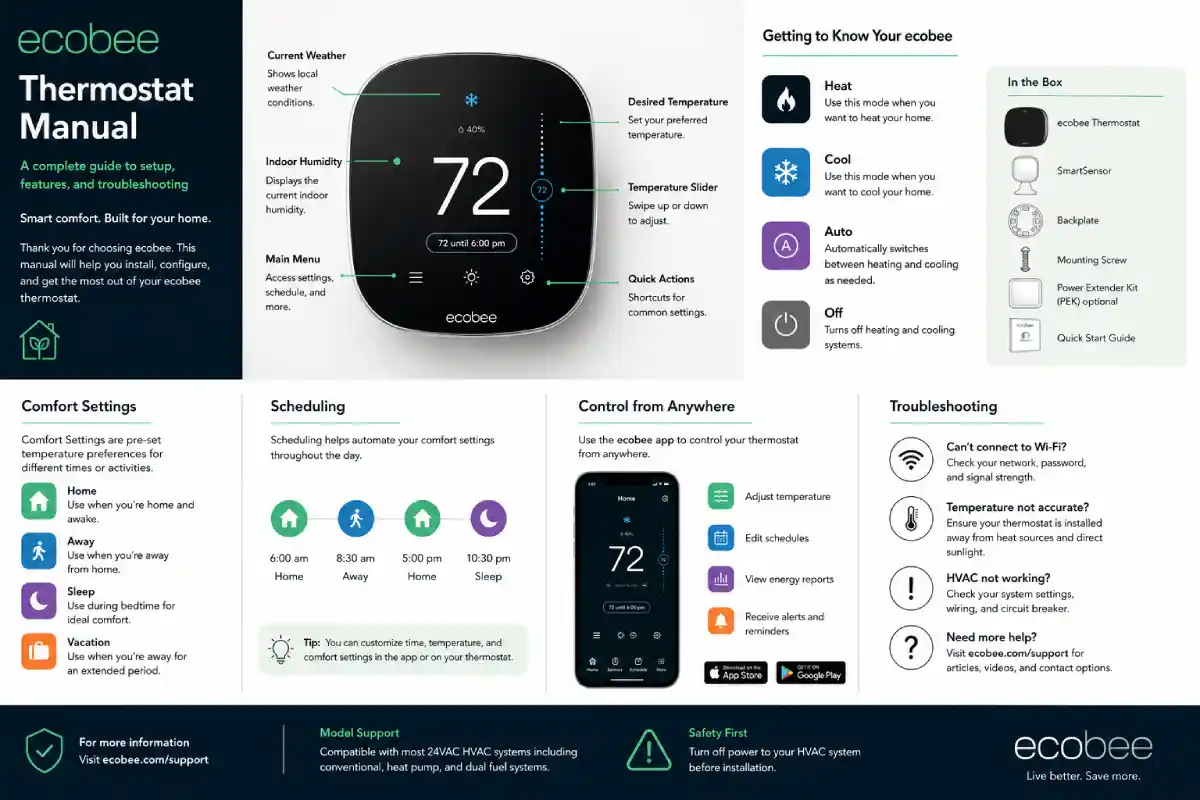
Whether you’ve recently installed an ecobee thermostat or bought a new home where ecobee was present from the beginning, the ecobee thermostat manual will be invaluable. At first appearance, ecobee may just appear to be the latest temperature control device but once you look deeper into it, you’ll discover features like scheduling, occupancy sensing, comfort settings, remote control, energy reports, and more smart-home features, plus some HVAC-dedicated configurations. But don’t worry, you don’t need to be an HVAC expert to enjoy Ecobee thermostats.
Let me show you Ecobee’s main settings, how to schedule a custom plan to manage costs and set priorities, the comfort modes, and what to do when the Ecobee thermostats don’t work properly or when issues need to be addressed.
Keep in mind that since ecobee has so many models, including Smart Thermostat Essential, Smart Thermostat Enhanced, and Smart Thermostat Premium in current production, along with former, discontinued models like the Smart Thermostat with voice control, ecobee3, and ecobee4 thermostats, there are some menu differences between models.
Table of Contents
What Is an ecobee Thermostat?
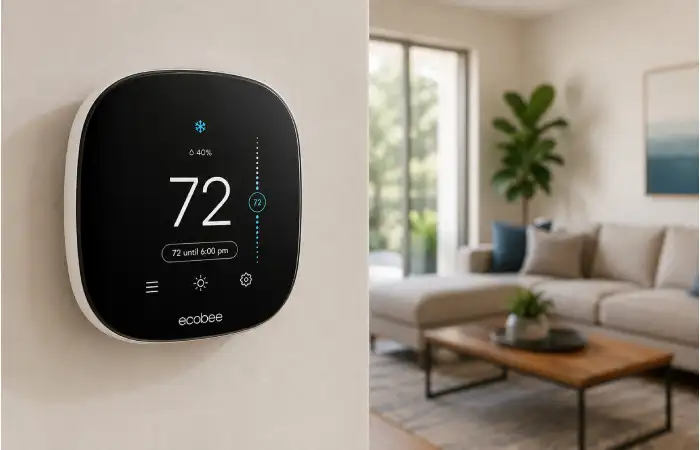
An ecobee thermostat is a smart thermostat that manages heating and cooling in a home, adding enhanced control over temperature, schedules, power consumption, and overall comfort for homeowners. Many old-style thermostats essentially maintain the temperature at a level you have manually set on the device.
With a smart thermostat like an ecobee, that is just the tip of the iceberg in terms of what temperature, occupancy detection, additional sensors, smartphone controls, home automation features, and other settings allow you to maintain whatever temperature you feel is ideal.
In simplest terms, the ecobee can be described as the control center of your home, working in concert with your HVAC to optimize and minimize energy consumption.
An ecobee will connect to your HVAC system via wires and to your home’s network wirelessly to operate functions with either the phone app or the device. You can also connect Ecobee with other major smart home hubs, with capabilities varying by device.
What Does an ecobee Thermostat Manual Explain?
An ecobee thermostat manual is essentially a reference guide for understanding and operating the thermostat.
Depending on the specific model, documentation can cover:
- Installation
- Wiring
- Wi-Fi setup
- HVAC configuration
- Temperature adjustment
- Heating and cooling modes
- Fan operation
- Comfort settings
- Scheduling
- SmartSensor configuration
- Vacation settings
- Alerts and reminders
- Energy reports
- App controls
- Troubleshooting
One important point to remember: there is no single universal ecobee manual for every thermostat.
The exact instructions can differ between an older ecobee model and a newer Smart Thermostat. ecobee’s official installation page provides documentation for current products and also maintains resources for discontinued models.
ecobee Thermostat Models at a Glance
Here is a simple comparison to understand the current range.
| Feature | Smart Thermostat Essential | Smart Thermostat Enhanced | Smart Thermostat Premium |
| Positioning | Value model | Mid-range | Premium |
| Energy-saving features | Yes | Yes | Yes |
| Smartphone control | Yes | Yes | Yes |
| Smart-home integration | Yes | Yes | Yes |
| Occupancy sensing | Basic/current model features | Advanced sensing | Advanced sensing |
| Air-quality monitoring | No | No | Yes |
| SmartSensor support | Available depending on configuration | Yes | Yes |
| HVAC compatibility | Over 85% of systems | Over 90% of systems | Broad compatibility |
| Typical buyer | Basic smart control | Balanced features | Maximum features |
ecobee currently lists the Essential at $139.99, Enhanced at $199.99, and Premium at $259.99 on its U.S. website; prices can change and may differ by market.
Understanding the ecobee Thermostat Screen
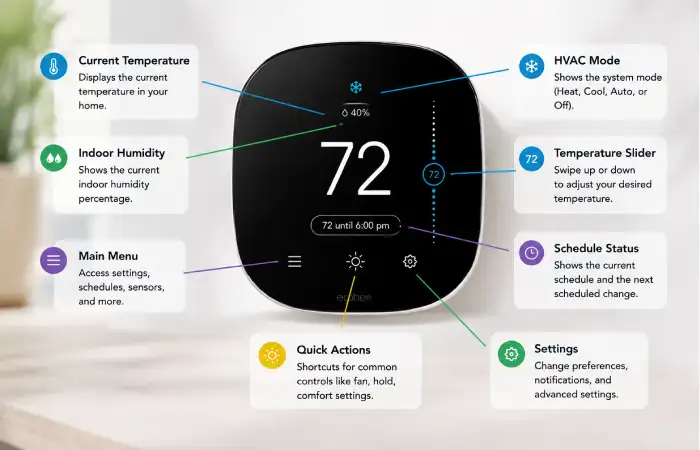
The touchscreen is the part most people interact with every day.
The exact appearance varies by model, but the main screen typically displays the current and desired temperatures, HVAC mode, fan controls, and menu options.
Current Temperature
This is the temperature the thermostat is detecting in the area where it is installed.
For example, if the screen shows 74°F, that does not necessarily mean your entire house is exactly 74°F. It represents the temperature detected by the thermostat or the sensor being used for the current comfort setting.
Desired Temperature
The desired temperature, sometimes called the setpoint, is the temperature you want your HVAC system to reach.
For cooling, you might set the desired temperature to 72°F.
For heating, you might select 68°F.
The HVAC system then operates according to its configured settings and equipment capabilities.
HVAC Mode
The mode tells the thermostat what type of operation you want.
Common options include:
- Heat
- Cool
- Auto
- Off
Some HVAC configurations may show additional options.
What Is an ecobee Comfort Setting?
One of the most useful concepts in the ecobee thermostat manual is the Comfort Setting.
A comfort setting is a predefined group of temperature preferences designed for a particular situation.
For example, you may want your home to feel different when you are sleeping compared with when everyone is awake.
Typical comfort situations can include:
Home
This setting is intended for periods when people are at home and want normal comfort.
You might choose a slightly cooler temperature during summer and a warmer temperature during winter.
Away
Away settings are designed for periods when nobody is home.
The goal is usually to allow a wider temperature range instead of maintaining the same comfort level all day.
Sleep
Sleep settings allow you to create a different temperature range for nighttime.
This can be useful because many people prefer a slightly different temperature while sleeping.
The exact options and behavior can depend on your ecobee model and configuration.
How Does an ecobee Schedule Work?
An ecobee schedule tells the thermostat what temperature preferences to use at different times of the day.
Instead of manually adjusting the thermostat every morning and evening, you can set up a routine.
For example:
Morning: Home comfort setting
Daytime: Away or another energy-saving setting
Evening: Home comfort setting
Night: Sleep comfort setting
This is one of the biggest advantages of owning a programmable smart thermostat.
A schedule also makes the thermostat more predictable. Once it is configured properly, you do not have to remember to adjust the temperature several times every day.
Why Are Smart Sensors Important?
Some ecobee thermostats can work with ecobee SmartSensors.
A SmartSensor is a remote sensor that can provide information about temperature and occupancy in another location.
This matters because a thermostat installed in a hallway may not represent the temperature in a bedroom or living room.
For example, imagine your thermostat is downstairs while your bedroom is upstairs. The thermostat might say the house is comfortable while the bedroom feels noticeably warmer.
A remote sensor can give the system additional information to consider.
The Smart Thermostat Premium and Enhanced are designed around more advanced sensing capabilities, while the Essential is positioned as the simpler value-oriented model.
What Is Smart Home/Away?
Smart Home/Away features more closely match temperature control to your actual presence at home. Smart ecobee thermostats can use occupancy data to adjust comfort settings rather than follow a strictly time-based schedule. This is especially handy with hectic households.
Let’s say your typical leave at 8 AM is no longer the case on Fridays when you work from home.
A strict schedule program would dictate that your home be empty at that time. Smart occupancy behaviors can allow more active responses. The trick here is to not assume automation will always work like you think. Confirm your comfort settings and occupancy programming match up with the activity within your home.
How to Adjust the Temperature
Temperature adjustment is one of the simplest functions.
From the thermostat screen, select or adjust the desired temperature. The thermostat then uses that setting according to the current mode and comfort configuration.
There is a smartphone application that you can also use for managing your compatible ecobee thermostat. If you are traveling somewhere else when away from home, it would provide a handy way of making a temporary change before you reach your destination, and the ecobee will continue on with your schedule. Any thermostats from ecobee you could get today feature smartphone capabilities (though this function differs with different units).
What Is a Temperature Hold?
A temperature hold is a temporary instruction telling the thermostat to maintain a selected temperature instead of immediately following its normal schedule.
This can be useful when your plans change.
For example, perhaps your schedule normally switches to an energy-saving temperature at 10:00 PM, but you are having guests over and want the house to remain cooler for longer.
Instead of changing your entire schedule, a temporary hold can handle the situation.
Afterward, the thermostat can return to its normal programmed behavior depending on the hold configuration.
How to Use Fan Settings
The fan is responsible for moving air through the HVAC system.
Depending on your equipment, you may have options such as:
- Auto
- On
- Scheduled fan operation
Auto generally means the fan runs when the HVAC system calls for heating or cooling.
On generally keeps the fan running continuously for the selected period.
The correct choice depends on your HVAC system and personal preference. Continuous fan operation may improve air circulation in some homes, but it can also increase electricity use.
What Is Vacation Mode?
Vacation mode is used when you are planning to be out of the house for several days, and the routine thermostat schedule is just not going to cut it. Rather than adjusting the daily thermostat program for multiple days at a time, a separate strategy is prepared in advance, and the smart thermostat is put into vacation mode.
Vacation mode is perfect for business and personal travels, as well as a extended vacation trip. Just remember to check out your start and stop dates for Vacation Mode, so you don’t come home a day or three early to a temperature far from optimal.
ecobee Thermostat and Energy Savings
One of the main reasons people choose a smart thermostat is energy management.
The basic idea is simple:
You do not need to heat or cool an empty house as aggressively as you would when people are home.
A properly configured schedule can reduce unnecessary HVAC operation.
ecobee states that some current models can provide savings of up to 23% or 26% on heating and cooling costs under its stated conditions. These are manufacturer estimates, not guarantees for every household. Actual savings depend on climate, HVAC equipment, insulation, thermostat settings, utility rates, household behavior, and other factors.
This distinction is important. Buying a smart thermostat alone does not guarantee a lower electricity bill.
The settings you use matter.
What Is the Power Extender Kit?
The Power Extender Kit, commonly called the PEK, is an important part of some ecobee installations.
Some HVAC systems do not have a conventional C-wire available at the thermostat location.
The C-wire provides a continuous source of power for many smart thermostats.
ecobee offers the Power Extender Kit on compatible systems so that certain installations can work without running a new fifth wire. The current Smart Thermostat Enhanced, for example, includes a PEK, while the Essential lists its PEK as sold separately.
Because HVAC wiring carries electrical power, installation should not be treated like ordinary low-risk DIY wiring. If you are uncertain about your wiring, HVAC equipment, or electrical connections, professional installation is the safer choice.
Common ecobee Thermostat Problems
Even a well-designed thermostat can occasionally display an unexpected message or behave differently than expected.
Here are some common situations.
ecobee Thermostat Is Not Turning On
If the thermostat screen is completely blank, check the HVAC power supply first.
Possible causes include:
- HVAC system power is off
- Circuit breaker has tripped
- Wiring problem
- Power issue
- Incorrect installation
- HVAC equipment problem
Do not repeatedly reconnect wires while the system is energized.
ecobee Is Not Connecting to Wi-Fi
If the thermostat works but cannot connect to your network, check:
- Whether your home Wi-Fi is working.
- Whether other devices can connect.
- Whether the Wi-Fi password is correct.
- Whether the thermostat is within suitable wireless range.
- Whether your router has recently changed settings.
Restarting the network equipment can sometimes solve a temporary connection problem.
The House Is Too Warm or Too Cold
Start with the simplest questions.
Is the thermostat in an appropriate location?
Is the correct HVAC mode selected?
Are the air filters excessively dirty?
Are vents blocked?
Is the desired temperature correct?
If the thermostat calls for heating or cooling but the HVAC equipment does not respond properly, the issue may be with the HVAC system rather than the thermostat.
Temperature Seems Different From Another Room
This happens all the time. A thermostat only monitors conditions in one area. Bedrooms may be warmer if the afternoon sun shines on them, they are poorly insulated, they are large rooms, they have little air movement, they have no or large windows, or they are on the floor above the main living space. If there are room temperature discrepancies in your house, consider adding a remote sensor.
ecobee Thermostat Premium: What Makes It Different?
This Premium model is likely better for users who already want features beyond simple smart temperature control. Ecobee calls Premium to offer indoor air-quality monitoring, air-filter notifications, smart home functionality, room sensors, smart security, and occupancy sensing on top of regular climate control.
That feature set will also be attractive to people who already have another system in their home, like Alexa but for a thermostat; it will be for you to put an end to your thermostat’s job by turning it into more than another smart home device.
The features come at a higher cost, however, and they are likely overkill for any homeowners who only want to set the temperature by schedule or by using an app on a smartphone to make adjustments remotely.
ecobee Enhanced: The Middle Ground
The Smart Thermostat Enhanced sits between the Essential and Premium.
ecobee describes it as a thermostat that adapts to household routines while offering advanced occupancy sensing and a larger high-resolution display. It also supports smartphone control and is designed to work with a broad range of HVAC systems.
For many households, this model can be a practical middle-ground option.
You get more advanced features than a basic smart thermostat without necessarily paying for every premium feature.
ecobee Essential: A Simpler Approach
The Smart Thermostat Essential Smart Ecobee should give you a reason to pay for smart home thermostats. With smart Scheduling, and “over 85% of existing HVAC systems “Smart Control” smart home” will be the best way to stay comfortable. Smart home Ecobee Smart thermostats provide reliable use and smart solutions; it’s ideal for someone looking to transition into intelligent thermostats. It would be a smart purchase for anyone wanting to make smarter heating and cooling control without demanding high-quality security.
How to Get the Correct ecobee Manual
If you are searching online for an ecobee thermostat manual, do not download the first PDF you find.
First, identify the exact thermostat model.
Look at:
- The thermostat itself
- The packaging
- The ecobee app
- The product name
- The model information
- The installation documentation
Then use Ecobee’s official installation and support resources.
This becomes much more relevant to older thermostats, as there’s often considerable variation in installation guides and functionality from one generation to the next. In ecobee’s case, the company has published in a support document that retired thermostats will continue to have access to guides and manuals supported by their team.
Should You Install an ecobee Thermostat Yourself?
That all depends on your experience level. While the physical process is simple, the tricky part for many is the HVAC wiring itself. Identify your current system setup and confirm compatibility with the ecobee before you begin, and never rely solely on color—the terminal and the actual system determine what a wire does.
High-tech heat pumps, multiple cooling or heating zones, a humidifier, a dehumidifier, or anything beyond the basics might be best left to the pros and will save you a lot of headaches.
Final Thoughts on the ecobee Thermostat Manual
The ecobee thermostat guide covers much more than just installation. It’s a good way to get comfortable with how the thermostat interacts with your HVAC system and to configure the features you really want to use.
The key concepts are actually pretty straightforward once you strip it down: Setpoints determine comfort; schedules set routine temperatures; comfort settings group those points; sensors provide extra data; and smart features make it better at reacting to how you’re really using your home.
Also Read: https://www.technologybeam.com